
It's much easier to write a program in assembly language than in machine language but a programmer must still consider all the intricate details of the machine: what is the instruction set? how many registers? how many bits are in each register? how are conditions treated?, etc., etc.
As the cost of computers came down, more and more of them were sold and the number of computer programmers increased dramatically. Rather than insist that every programmer learn assembly language and machine details, high-level languages were developed to further simplify the programming task.
An assembly-language programmer must take a very microscopic view of the task being programmed. For example, the simple pseudocode statement:
is coded in assembly language as:
| LOAD | B | |
| ADD | C | |
| STORE | A | |
| . | . | |
|---|---|---|
| . | . | |
| . | . | |
| A: | .DATA | 0 |
| B: | .DATA | 0 |
| C: | .DATA | 0 |
Assembly language has the following problems:
High-level programming languages overcome these deficiencies:
In this chapter we use C++ to illustrate the concepts of a high-level language - the next chapter describes other high-level languages.
As an example, Fig. 8.2 shows a very simple C++ program.
//program numerology
//this program gets the user's favorite number
//and prints a greeting.

#include < iostream >
using namespace std;

void main()
{
    int your_number; //stores the number entered by the user

    cout << "Please enter your favorite number: ";
    cin  >> your_number;
    cout << endl;
    cout << "Your favorite number is " << your_number << "."
                   << endl;
    cout << "That is a nice number." << endl;
}
//program numerology                                           //Line  1
//this program gets the user's favorite number                 //Line  2
//and prints a greeting.                                       //Line  3

#include < iostream >                                          //Line  4
using namespace std;                                           //Line  5

void main()                                                    //Line  6
{                                                              //Line  7
    int your_number; //stores the number entered by the user   //Line  8

    cout << "Please enter your favorite number: ";             //Line  9
    cin  >> your_number;                                       //Line 10
    cout << endl;                                              //Line 11
    cout << "Your favorite number is " << your_number << "."   //Line 12
                   << endl;
    cout << "That is a nice number." << endl;                  //Line 13
}                                                              //Line 14
prologue comment   [optional]
include directives [optional]
using directive    [optional]
functions          [optional]
main function
{
      declarations [optional]
      main function body
}
A declaration in C++ specifies the name and type of a data item but not the memory location of the item. The C++ compiler will figure out the best locations of the declared data items - it might, for example, decide to store some items in machine registers instead of RAM locations because the program uses them frequently.
The name of a data item is an identifier - a sequence of one or more letters, digits, and/or underscore symbols, _, that doesn't start with a digit. An identifier cannot be any of the keywords in C++ such as if, int etc. C++ is case-sensitive so, for example, FinalTotal and Finaltotal are names of two different data items. Most data items in a C++ program are variables with values that change as the program is executed or values that are not known ahead of time.
Each declaration defines the type of the variable being declared. Three of the C++ Standard Data Types are:
double Radius, Circumference ;
declares that Radius and Circumference are two real numbers.
To declare a constant we add the keyword const at the start of the declaration. For example:
const double PI = 3.1416;
declares that PI is a real constant with 3.1416 for its value.
One declaration can declare an array of variables. For example:
int Hits[12];
declares that Hits is an array of 12 integers as shown in Fig. 8.6.
Note that C++ indexes the elements of an array starting at 0 instead of 1 -
the first integer of this array is stored in Hits[0] and the last
integer is stored in Hits[11].
moveto(50, 60); lineto(150, 60) ; moveto(50, 70); lineto(150, 70) ; Every variable and constant must be declared before it can be used.
C++ statements correspond to the pseudocode operations described in Chapter 2:
| Pseudocode Operation | C++ Statement |
|---|---|
| Input | Input |
| Output | Output |
| Computation | Assignment |
| Conditional | if-else |
| Iterative | while |
This makes it easier for a programmer to take an algorithm written in pseudocode and translate it into a C++ program.
(8.5.1) - Input/Output Statements
An input operation in pseudocode gets data from the outside world - the data may come from a user sitting at the computer console, from a file stored on a disk, from another computer, etc., etc. A C++ program can read data from any of these sources but here we only describe how it can read data from a user sitting at the computer console.
Whenever a program expects to get some data from the user it should display a message on the screen, a prompt, to tell the user to enter the data. A pseudocode input operation like:
should really be preceded by a pseudocode output operation like:
Lines 9 and 10 in the numerology program is an example of a prompt followed by an input statement.
Line 12 in the numerology program is an output statement sending four items to the console screen:
Your favorite number is(including the space at the end;)
Outputting Real Numbers: The C++ statement:
cout.setf(ios::fixed) ;
prints all subsequent output of real numbers in fixed-point format
while:
cout.setf(ios::scientific) ;
prints all subsequent output of real numbers in scientific notation.
For example, 1234.56789 in fixed-point format is printed as 1.23456789e+3 in scientific notation.
The C++ statement:
cout.precision(2)
sets the number of fractional digits in all subsequent output to 2.
For example, the number 1234.56789 will be printed as
1234.57 in fixed-point format or as 1.23e+3 in
scientific notation.
(8.5.2) - The Assignment Statement
The C++ assignment statement corresponds to the computation operation in pseudocode -
in pseudocode corresponds to:
variable = expression;
in C++. The expression on the right gets evaluated and the result is then written
into the memory location named on the left - the new result overwrites the previous
value in that location. For example, read the comments in the following C++ code:
   int A, B, C;

   B = 2;     //sets the value of B to 2
   C = 5;     //sets the value of C to 5
   A = B + C; //sets the value of A to 7
   A = A + 1; //changes the value of A to 8
   B = A + B; //changes the value of B to 10
The symbols for addition, subtraction, multiplication, and division are: +, -, *, and /, respectively. These operations are illustrated by the comments in the following C++ code:
   int A, B, C, D;

   A = 20 + 5;   //sets the value of A to 25
   B = 20 - 5;   //sets the value of B to 15
   C = 20 * 5;   //sets the value of C to 100
   D = 20 / 5;   //sets the value of D to 4
Dividing an integer by an integer is like long-division in grade school - the quotient is always an integer and you might get a non-zero remainder. C++ uses the % symbol to obtain the remainder:
   int A, B, C, D;

   A = 17;
   B = 6;
   C = A / B ; //sets the value of C to the quotient, 2
   D = A % B ; //sets the value of D to the remainder, 5
When the operands are real numbers, the results are real numbers:
   double A, B, C, D, E, F;

   A = 6.75 ;
   B = 4.5 ;
   C = A + B;  //sets the value of C to 11.25
   D = A - B;  //sets the value of D to 2.25
   E = A * B;  //sets the value of E to 30.375
   F = A / B;  //sets the value of F to 1.5
If an arithmetic operation combines an integer with a real number then the integer is converted to a real number before the operation is performed.
If the variable on the left side of an assignment statement is real and the value of an expression is an integer then the expression value is converted to a real value as it is stored in the variable.
If the variable on the left side of an assignment statement is an integer and the value of an expression is real then the expression value is truncated (by removing the digits of the fraction part) to an integer when it is stored. For example,
double A, B ;
int C ;
A = 4.125 ;
B = 1.5 ;
C = A / B ; // C is set to 2 since that is the integer part of 2.75
The assignment statement can also set the value of a character variable to a particular character:
   char  A, B, C, D ;

   A = 'm' ; //Sets the value of A to the lower-case m
   B = '4' ; //Sets the value of B to the digit 4
   C = ' ' ; //Sets the value of C to the space character
   D = '&' ; //Sets the value of D to the ampersand character
It's good practice to assign initial values to variables when they are declared:
int count = 0 ;declares count to be an integer variable and sets its initial value to 0.
(8.5.3) - Control Statements
A C++ if-else statement corresponds to a conditional operation in pseudocode and a C++ while statement corresponds to an iterative operation in pseudocode. Both statements evaluate a Boolean condition and modify the flow of control in a program based on the truth or falsehood of that condition.
Boolean Conditions: A Boolean condition can compare two arithmetic values with any of the six comparison operators shown in the following table:
| Symbol | Condition Tested |
|---|---|
| == | the two values are equal |
| != | the two values are not equal |
| < | the first value is less than the second value |
| <= | the first value is less than or equal to the second value |
| > | the first value is greater than the second value |
| >= | the first value is greater than or equal to the second value |
The following table shows some examples of Boolean conditions:
| Boolean Condition | The condition is true if and only if: |
|---|---|
| count == 0 | the value of count equals 0. |
| divisor != 0 | the value of divisor is non-zero. |
| count < limit | the value of count is less than the value of limit. |
| sum >= 100 | the value of sum is greater than or equal to 100. |
C++ has three Boolean operators, AND, OR, and NOT, to build complex Boolean conditions from simple coonditions. The symbols of the Boolean operators and examples are shown in the following table:
| Symbol | Boolean Operator | Example | Condition Tested |
|---|---|---|---|
| && | AND | (x>0)&&(x<10) | is x greater than 0 and less than 10 |
| || | OR | (k == 0)||(k == 1) | does k equal 0 or 1 |
| ! | NOT | !(x > y) | is x less than or equal to y |
Conditional Statements: The flow chart for a conditional operation in pseudocode is:
   if(Boolean condition)
        Statement1;
   else
        Statement2;
First the Boolean condition is evaluated. If the condition is true then Statement1 is performed - else (i.e., if the condition is false) then Statement2 is performed. Consider the following example where A, B, and C are integer variables:
   if( 2*B < (A + C))
       A = B ;
   else
       C = B ;
Suppose that A = 2, B = 4, and C = 7 when the condition is
evaluated, then 2*B = 8 is less than (A + C) = 9 so the
first statement, A = B, is performed to set A to 4.
But now suppose that A = 2, B = 5, and C = 7 when the condition is evaluated, then 2*B = 10 is not less than (A + C) = 9 so the second statement, C = B, is performed to set C to 5.
An if statement in C++ is an if-else statement without the else clause - no statement is performed if the Boolean condition is false. For example:
  if ( A > LargestSoFar )
      LargestSoFar = A ;
sets LargestSoFar to the value of A if A is larger than
LargestSoFar, else it does nothing.
A compound statement is a sequence of C++ statements put between curly braces, { and }. For example, the following C++ code sets Max to the larger of A and B and Min to the smaller of A and B:
  if( A > B )
    {
      Max = A ;
      Min = B ;
    }
  else
    {
      Max = B ;
      Min = A ;
    }
Note that if A and B have the same value then the code sets
Max and Min to their common value.
Looping (Iterative) Statements: The left side of the following diagram shows the flowchart of a While Loop in pseudocode and the right side shows the corresponding while statement in C++:
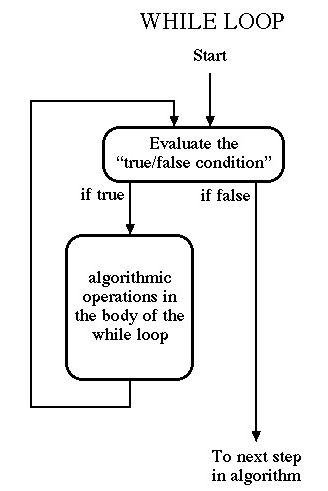 |
    while(Boolean Condition)
    {
        ...
        ...
        Body of the While Loop
        ...
        ...
    }
|
As an example, a while loop is used in the following C++ code that adds a series of non-negative numbers together.
Sum = 0; //Initialize Sum
cout << "Please enter numbers to add; ";
cout << "terminate with a negative number." << endl ;
cin  >> Number ; //Get the first number
while(Number => 0)
{
    Sum = Sum + Number;
    cin >> Number; //Get another number
}
cout << "The total is " << Sum << endl ;
Figure 8.16 is pseudocode for a program to process circles.
Get user's choice about continuing
While the user wants to continue
    Get the value of the radius
    Get value for the user's choice of task
    If task choice is circumference then compute and print circumference
        otherwise compute and print area
    Get user's choice about continuing
//program circle - Allows the user to compute the
//circumference or area of circles from their radii.
#include < iostream>
using namespace std;
void main()
{   const double PI = 3.1416;
    double Radius, Circumference, Area ;
    char Task_to_do, More;
    cout.setf(ios::fixed);
    cout.precision(2);
    cout << "Do you want to process a circle? (Y or N): "
    cin  >> More;
    cout << endl;
    while((More == 'Y') || (More == 'y')) //if the shift key is forgotten
    {   cout << "Enter the radius of the circle: "
        cin  >> Radius;
        cout << endl ;
        cout << "Enter your choice of task. << endl ;
        cout << "C to compute circumference, "
             << "A to compute area: ";
        cin  >> Task_to_do ;
        cout << endl ;
        if((Task_to_do=='C')||(Task_to_do=='c')) //if the shift key is forgotten
        {   Circumference = 2 * PI * Radius ;
            cout << "A circle of radius << Radius
                 << " has a circumference of " << Circumference << endl ;
        }
        else
        {   Area = PI * Radius * Radius ;
            cout << "A circle of radius << Radius
                 << " has an area of " << Area << endl ;
        }
        cout << endl ;
        cout << "Do you want to process more circles? (Y or N): "
        cin  >> More;
        cout << endl ;
    }
    cout << "Program will now terminate." << endl ;
}
The circle program above is fairly easy to write and understand because it has less than 40 lines. How do we manage the complexity of writing and understanding a 50,000-line program?
(8.7.1) - Divide-and-Conquer
Divide-and conquer is a common technique for handling complex tasks: if a task is very hard to solve then divide it into a number of simpler tasks - for example, Figure 8.17 shows a task, T, divided into four simpler tasks: A, B, C, and D.
Divide-and-conquer can be applied recursively - for example, Figure 8.18 shows task A being further divided into three simpler tasks: A1, A2, and A3.
Divide-and-conquer is used to manage the complexity of large programs - the code is divided into a number of modules (sub-programs) with each module performing part of the overall task.
Structure charts like Figures 8.17 & 8.18 are used to show how the overall program is divided into smaller and smaller sub-programs until each sub-program is so simple that it is easy to write its code.
(8.7.2) - Using Functions
In C++ each module is called a function. The main function at the top-level of the structure chart calls (invokes) its sub-programs in the proper order so as to perform the overall task.
As an example, we divide the circle program of Fig. 8.14 into three modules (Get input, Compute area, and Compute circumference) as shown in the structure chart of Fig. 8.19.
The pseudocode for the main function of the circle program is shown in Fig. 8.20.
To write the C++ code for the main function we need to give each sub-function an identifier and decide what information is passed between the main function and the sub-function. For the circle program we decide that:
        Get_Input(Radius, Task_to_do) ;
        Do_Circumference(Radius) ;
        Do_Area(Radius) ;
Each call statement contains the identifier for the called function followed by the argument list enclosed in parentheses - the argument list shows all variables pertaining to the called function. Each call statement is a sequential statement - control is passed to the code in the called function and when that code is completed, then control is passed back to the statement following the call statement in the main function.
Figure 8.21 shows the main function of the circle program using these call statements.
void main()
{
    double Radius ;
    char   Task_to_do, More ;
    cout.setf(ios::fixed) ;
    cout.precision(2) ;
    cout << "Do you want to process a circle? (Y or N): " ;
    cin  >> More ;
    cout << endl ;
    while((More == 'Y') || (More == 'y'))
    {
        Get_Input(Radius, Task_to_do) ;
        if((Task_to_do == 'C') || (Task_to_do == 'c'))
        {
            Do_Circumference(Radius) ;
        }
        else
        {
            Do_Area(Radius) ;
        }
        cout << endl ;
        cout << "Do you want to process more circles? "
             << "(Y or N): "
        cin  >> More ;
        cout << endl ;
    }
    cout << "Program will now terminate." << endl ;
}
(8.7.3) - Writing Functions
Here we consider how to write functions. The general outline for any function is:
        function header
        {
            local declarations //optional
            function body
        }
where the function header has three parts:
void Get_Input(double &Radius, char &Task_to_do )
//The ampersands are required because Radius and Task_to_do
//are passed from Get_Input to the caller.
{
    cout << "Enter the value of the radius of the circle: " ;
    cin  >> Radius ;
    cout << endl ;

    cout << "Enter your choice of task to do." << endl ;
    cout << "C to compute circumference, "
         << "A to compute Area: " ;
    cin  >> Task_to_do ;
    cout << endl ;
}
void Do_Circumference(double Radius)
//No ampersand is required because Radius is only passed from the
//caller to Do_Circumference.
{
    double Circumference ;
    Circumference = 2 * PI * Radius ;
    cout << "If the radius of a circle is " << Radius
         << " then the circumference is " << Circumference << endl ;
}
void Do_Area(double Radius)
//No ampersand is required because Radius is only passed from the
//caller to Do_Area.
{
    double Area ;
    Area = PI * Radius * Radius ;
    cout << "If the radius of a circle is " << Radius
         << " then the area is " << Area << endl ;
}
Nonvoid Functions: The Do_Circumference function described earlier computes the circumference of a circle and then outputs it to cout. The Circumference function shown below just computes the circumference:
double Circumference(double Radius)
{
    return 2 * PI * Radius ;
}
A nonvoid function is invoked whenever its return value is used. For example, the following statement in the main function invokes the Circumference function:
    cout << "If the radius of a circle is " << Radius
         << " then the circumference is "
         << Circumference(Radius) << endl ;
The traditional approach to programming is divide-and-conquer - break the overall task up into simpler sub-tasks that are easily programmed. A different approach is Object-Oriented Programming (OOP) - consider the program as manipulating objects in some domain of interest. As examples:
The idea of a class of objects is similar to the idea of a data type in C++. In the circle program Radius, Circumference, and Area are objects in the double class with one property, numeric quantity - each object in this class has its own specific value for that property.
But in OOP each class of objects may also have some subtasks associated with it - each object in the class can perform those subtasks. For example, a subtask in the savings account class may compute the compound interest - each savings account in the class can compute the interest due on its balance whenever it receives a request to perform that service.
Three terms associated with OOP are:
(8.8.1) - A C++ Example
Figure 8.29 shows a C++ program with four classes: Circle, Rectangle, Square, and Square2. After
#include < iostream>
using namespace std ;
the program defines the interfaces of the four classes:
class Circle
{
public:
    void Set_Radius(double value) ;
    //Sets the radius of the circle to value
    void Do_Area() ;
    //Computes and prints out the area of the circle
private:
    double Radius ;
}
class Rectangle
{
public:
    void Set_Width(double value) ;
    //Sets the width of the rectangle to value
    void Set_Height(double value) ;
    //Sets the height of the rectangle to value
    void Do_Area() ;
    //Computes and prints out the area of the rectangle
protected:
    double Width ;
    double Height ;
}
class Square
{
public:
    void Set_Side(double value) ;
    //Sets the side of the squaree to value
    void Do_Area() ;
    //Computes and prints out the area of the square
private:
    double Side ;
}
class Square2: public Rectangle
{
public:
    void Set_Side(double value) ;
    //Sets the side of the square to value
}
void main()
{
    Circle Joe ;
    Joe.Set_Radius(23.5) ;
    Joe.Do_Area() ;

    Rectangle Luis ;
    Luis.Set_Width(12.4) ;
    Luis.Set_Height(18.1) ;
    Luis.Do_Area() ;

    Square Anastasia ;
    Anastasia.Set_Side(3) ;
    Anastasia.Do_Area() ;

    Square2 Tyler ;
    Tyler.Set_Side(4.2) ;
    Tyler.Do_Area() ;
}
void Circle::Set_Radius(double value)
{
    Radius = value ;
}

void Circle::Do_Area()
{
    double Area ;
    Area = PI * Radius * Radius ;
    cout << "A circle with radius " << Radius << " has an area of "
         << Area << endl ;
}

void Rectangle::Set_Width(double value)
{
    Width = value ;
}

void Square2::Set_Side(double value) ;
{
    Width = value ;
    Height = value ;
}
(8.8.2) - What Have We Gained?
OOP is a popular way of programming because it has these advantages:
User input and output in early computers was text-oriented - users would enter data on a keyboard and see the output as text on a screen. Now we have graphical user interfaces (GUIs) that display output as imagery on a screen and allow the user to use a mouse to enter input.
For example, to copy, edit, delete, move, and print files, users don't have to learn dozens of text-oriented commands - a GUI can present users with a simple, easy to understand image like the one on page 398 of the text.
(8.9.1) - Graphics Primitives
A modern terminal screen uses a bitmapped display - thousands or millions of pixels (picture elements) arranged in a two-dimensional array as shown in Figure 8.32.
A high-resolution (1560 x 1280) display has 1280 horizontal lines (maxY = 1279) and 1560 pixels in each line (maxX = 1559) for a total of 1,996,800 pixels.
The image on the display is stored internally in a frame buffer. The color of each pixel is some mixture of the three primary colors, red, blue, and green so each pixel requires three bytes of storage. The frame buffer for a high-resolution display needs 5,990,400 bytes. Figure 8.33 shows that if the three bytes in column 24 of row 47 of the frame buffer all have zero values, then the color of pixel (24, 47) on the screen is black.
The typical graphics library contains hundreds of functions that can be used to draw an image on the screen. The text describes a simple black-and-white graphics library with the following ten functions:
For example the following code moves the pen to the middle of the graphics window:
    X = getmaxx() ;
    Y = getmaxy() ;
    moveto(X/2, Y/2) ;
    clearscreen(0) ;
    setcolor(1) ;
    moveto(20, 20) ;
    lineto(100, 100) ;
draws a black line from pixel (20, 20) to pixel (100, 100).
rectangle(25, 60, 75, 100) ;
or the code:
rectangle(75, 100, 25, 60) ;
draws a rectangle with corners at pixels (25, 60), (75, 60), (75, 100), and
(25, 100).
circle(100, 150, 125) ;
draws a circle where every part that is beyond the window boundaries
being clipped.
    circle(200, 200, 40) ;
    writedraw("Stop", 186, 200) ;
draws a circle with the message "Stop" in the middle.
    rectangle(100, 100, 150, 200) ;
    writedraw("Stop", 111, 150) ;
drew a rectangle labelled "Stop";
then this code will test to see if the user clicked the mouse inside the rectangle:
    getmouse(X, Y) ;
    if( (X >= 100) && (X <= 150) && (Y >= 100) && (Y <= 200) )
    {
        //the user clicked inside the rectangle
        //and wants to Stop
    }
    else
    {
       // the user clicked somewhere else
    }
Hint: Use the Pythagorean Theorem for right triangles - the square of the hypotenuse equals the sum of the squares of the other two sides.
(8.9.2) - An Example of Graphics Programming
Here we show the code for drawing a titled window.
This code draws a narrow Title rectangle with a large rectangle below it:
    clearscreen(0) ;
    setcolor(1) ;
    rectangle(50, 50, 350, 80) ;
    rectangle(50, 80, 350, 330) ;
Then this code draws four lines to divide the top rectangle into thirds horizontally and vertically:
    moveto(50, 60);  lineto(150, 60) ;
    moveto(50, 70);  lineto(150, 70) ;
    moveto(250, 60); lineto(350, 60) ;
    moveto(250, 70); lineto(350, 70) ;
and then a writedraw command is added to insert the title:
    clearscreen(0) ;
    setcolor(1) ;
    rectangle(50, 50, 350, 80) ;
    rectangle(50, 80, 350, 300 ) ;
    moveto(50, 60) ;  lineto(150, 60) ;
    moveto(50, 70) ;  lineto(150, 70) ;
    moveto(250, 60) ; lineto(350, 60) ;
    moveto(250, 70) ; lineto(350, 70) ;
    writedraw("Title", 180, 70 ) ;